AI Slides

Specialized AI slide generator or general AI model? Which method is best for consulting slides?

Updated: Oct 8, 2026
Specialized AI slide generator or general AI model? Which method is best for consulting slides?

Short answer: As of October 2026, no AI tool we tested turns a report into a client-ready McKinsey or BCG deck from a single prompt. 

General-purpose models have caught up with, and in our test overtaken, the specialized consulting slide generators. Claude (Opus 5.5) produced the strongest out-of-the-box deck, ChatGPT produced a clean but thin one, and Gamma produced the most polished design for non-consulting use. 

The specialized tools, Perceptis and Oria, delivered solid storylines but slides that would need substantial rework before a client meeting.

Back in May, we tested five different AI tools for generating consulting-level slides. Our results then showed the none of the tools came close to real consulting deliverables, but specialized, consulting-focused tools were generally better.

Since then, the large AI labs in the forms of OpenAI and Anthropic have taken big steps forward in slide generation. We were therefore excited to re-do our test from May and see what the changes are.

In this article, we cover the three overall types of AI slide tools available today (October 2026), how we tested six of them on the same consulting brief, a tool-by-tool review with example slides, and a comparison table you can use to pick the right tool for your use case.


Three ways to generate consulting slides with AI

In our view, AI slide tools for consulting slides fall into three general groups:

  1. Specialized consulting slide generators such as Perceptis, Oria and Xavier AI. These tools are built specifically for strategy consultants. They promise MECE storylines, action titles and the dense, chart-heavy slides you see in McKinsey or BCG decks.
     
  2. General AI slide generators such as Gamma and Plus AI. These tools are built for anyone who needs a presentation quickly. They focus on visual design, templates and speed.
     
  3. General-purpose AI models such as Claude and ChatGPT. These are the large language models themselves, which can now read a source document, plan a storyline and produce an editable PowerPoint file directly in the chat.

As mentioned, when we ran our first test in May, none of the tools could produce client-ready slides but the specialized tools came closest. The general purpose slide generators often couldn’t produce actual .pptx files and struggled with charts, which are a significant component in any consulting deck.

Since then, the large AI labs have made significant progress on slide generation, with the release of Claude Fable 5.1, Claude Opus 5.5, and GPT-6 Astra as some of the real differentiators in the slide space. That raises a practical question for anyone who makes decks for a living: do you still need a specialized slide tool, or is the model you already pay for good enough?


How we tested the tools

We gave every tool the same input and the same instruction, and judged the output the way we would judge a junior consultant’s first draft. We deliberately wanted to focus on the various tools' ability to turn data into slides (as opposed to doing research and analysis) so we used a full report as the input.

The source document: A 28-page public industry report, the China Juice Market Report published by Citrus Australia in January 2024. It contains market sizing, import data, competitor profiles and a consumer survey. This is typical raw material for a market analysis deck.

The prompt: “Turn this report into a consulting-style deck, similar to what McKinsey or BCG would produce.” We kept it deliberately short. Where a tool asked follow-up questions, we accepted its recommended option.

The tools and versions:

  • Perceptis (web app, Starter plan)
  • Oria (run through its Claude connector, Opus 5.5)
  • Gamma (web app)
  • Plus AI (both the web app and the PowerPoint add-in)
  • ChatGPT (GPT-6.1 Sol, High reasoning)
  • Claude (Opus 5.5 in Cowork, output in Claude Slides)

The criteria: we used the same four criteria as in our May test, plus cost.

  1. Storyline quality: Does the deck make an argument, with an executive summary and action titles that state the “so what”? (See our guides on executive summaries and action titles.)
     
  2. Slide-level quality: Are layouts clean, consistent and data-led? Is anything cut off, overlapping or left as a placeholder?
     
  3. PowerPoint readiness: Can you get an editable .pptx file with native charts and text?
     
  4. Time to generate: Wall-clock minutes from submitting the prompt to a finished deck.
     
  5. Cost: What you need to pay to produce a deck of this size.

The ultimate bar to pass: Would we send this to a client after 30 minutes of clean-up?


Results: Specialized consulting slide generators

Perceptis

Verdict: A sound storyline let down by dated, poorly formatted slides. Not close to client-ready.

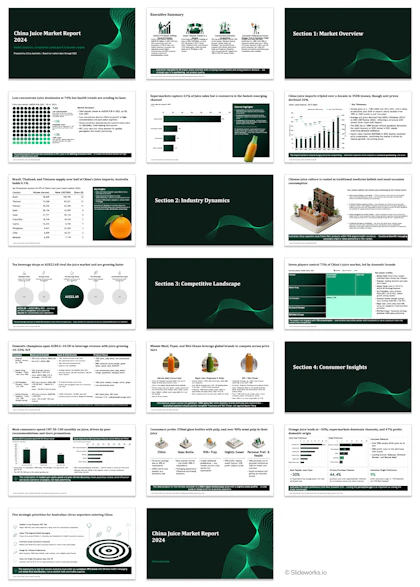
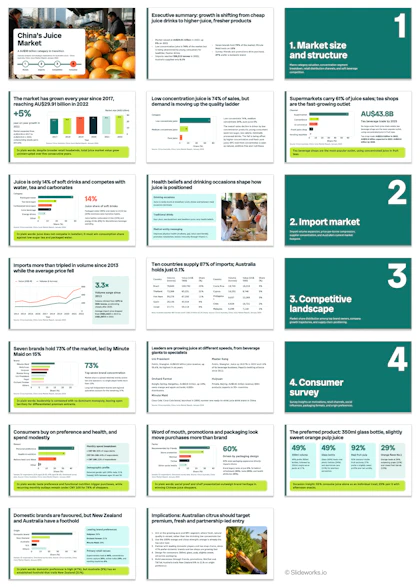
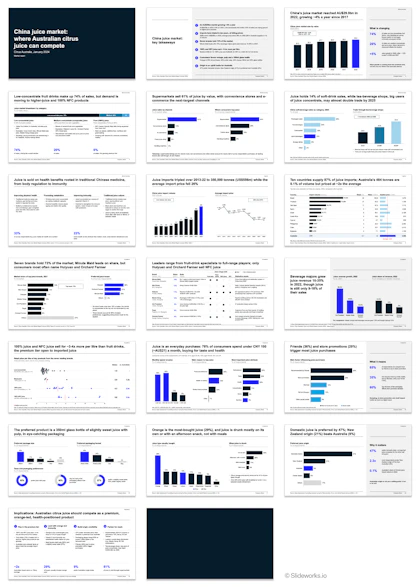
Overview of the 20-slide China juice market deck generated by Perceptis, with dark green section dividers, charts and 3D illustrations

The output from Perceptis when asked to turn a report into a deck

This was one of the best tools in our previous test, so we were excited to see how it would do. 

Perceptis generated a 20-slide deck in 11 minutes. The storyline is fine and most slides have a proper action title (“Supermarkets capture 61% of juice sales but e-commerce is the fastest-emerging channel”) and sourcing.

The problems are at the slide level:

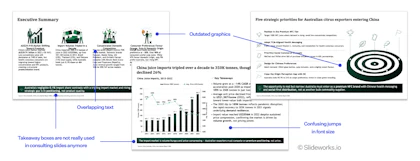
  • Old-school visuals: The deck leans on 3D isometric illustrations (a traditional Chinese medicine shop, stylised juice bottles) and stock product photos, as well as dark takeaway boxes on nearly every slide. This makes it look outdated and an outside-in view of what consulting slides look like, rather than actual slides from McKinsey, BCG, and Bain.
     
  • Formatting errors: On the executive summary, the column headings overlap the body text. On the “Tea beverage shops” slide, four of the five bubbles are empty grey circles with a dash where the number should be. Some of the slides struggle with spacing and visual balance, with too much white space under the slide content, or a distracting mix of font sizes.
     
  • Few good charts: Only a handful of slides use data charts. Four of the 20 slides are section dividers.
Three Perceptis slides annotated to show outdated graphics, overlapping text, jumps in font size and old-fashioned takeaway boxes

Examples from the Perceptis deck that require some rework

Cost and workflow: The Starter plan costs $29 per month for 50 slide credits, and one slide uses one credit. This single 20-slide deck used 40% of the monthly allowance. The next tier, Pro, is $129 per month for 100 credits. Perceptis exports a native .pptx and offers a PowerPoint add-in.


Oria

Verdict: Chart-heavy and data-rich, but slides look assembled rather than designed. Not close to client-ready.
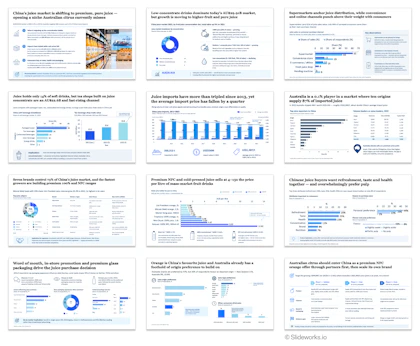
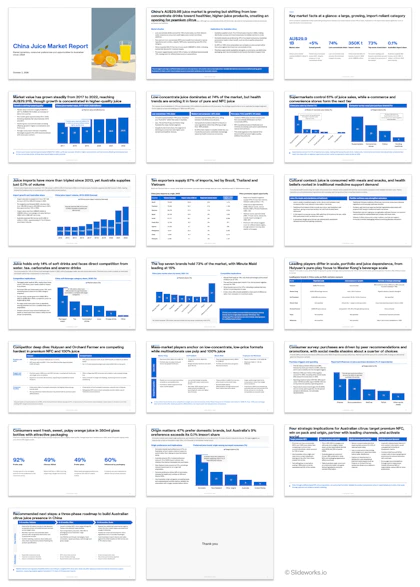
Overview of the 12-slide China juice market deck generated by Oria, with blue charts, icons and dense data on most slides

The output from Oria, a specialized AI tool for creating consulting slides

Oria does not run as a standalone app in this workflow. It works as a connector inside Claude, so you need a Claude subscription on top of Oria’s own tokens. Before building, it asked three good questions: which storyline to argue (it recommended an “Australian exporter lens”), which visual style to use, and how long the deck should be. It then produced 12 slides in 19 minutes, the slowest run in the test.

The storyline is reasonable. It opens with an action-titled executive summary and closes with a phased entry recommendation (validate, enter, scale), and the slides inbetween are data-driven and thorough.

The slides are chart-heavy, which is the right instinct for consulting slides, but the execution is weak:

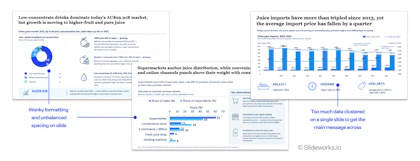
  • Inconsistent typography: Font sizes vary from slide to slide and within slides. Chart labels in particular jump between sizes.
     
  • Overcrowding: Several slides squeeze three charts and an implication box into one page, with very little spacing.
     
  • Broken chart elements: Doughnut chart labels overlap the segments (one reads “4 0…”), and a stacked flavour bar renders with its labels on top of each other.
Three Oria slides annotated to show uneven formatting and spacing, and an import chart with too much data to get the main message across

An example of some of the issues with the Oria slides and where it doesn't live up to consulting standards

Cost and workflow: Oria charges in tokens: 40 tokens cost $10. Rendering our 12-slide deck required 12 tokens, and exporting it as editable PowerPoint required another 12. Our account ran out of tokens mid-build, and Oria offered to cut the deck to seven slides as a PDF unless we topped up. Budget roughly $6 per 12-slide editable deck, plus your Claude plan.


Results: General AI slide generators

Gamma

Verdict: The fastest and most polished design in the test, but built for marketing and internal decks, not consulting deliverables.

Overview of the 20-slide China juice market deck generated by Gamma, with stock photos, numbered section dividers and multicoloured charts

The output from Gamma

Gamma generated a 20-slide deck in a few minutes, with the most user-friendly interface of any tool we tested. It’s clear that Gamma is a visual-first product. The deck uses simple charts, large headline numbers and full-bleed photos for visual variety.

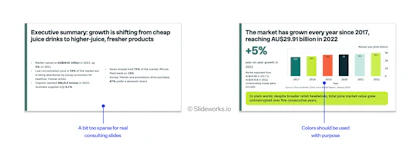
To its credit, the titles are mostly real action titles (“Imports more than tripled in volume since 2013 while the average price fell”), and every chart carries a source line. As a marketing report or an internal team update, this deck would work almost as is.

It does not look like an MBB deck, however, for two main reasons:

  • Decorative color: Each bar in a chart has a different colour (teal, lime, coral, navy) with no meaning attached. Consulting decks use color to highlight the one data point that matters.
     
  • Thin analysis: Large sections of the source report, such as the competitor profiles, are reduced to a single chart or a divider slide.
Two Gamma slides annotated: an executive summary too sparse for consulting, and a bar chart with a different colour on every bar

The Gamma slides are quite good but don't work in a consulting context

Cost and workflow: The free plan generates up to 10 slides per prompt, so you need a paid plan for a 20-slide deck. Gamma exports to PowerPoint, Google Slides, PDF and PNG.


Plus AI

Verdict: Text-heavy, repetitive slides with visible formatting errors. Not client-ready.

Overview of the 20-slide China juice market deck generated by the Plus AI web app, with blue headers, bullet text and blue bar charts

The output from PlusAI's web app

Overview of the 16-slide China juice market deck generated by the Plus AI PowerPoint add-in, in teal with bar charts and bullet text

We tested both Plus AI’s web app (about 2 minutes to generate 20 slides) and its PowerPoint add-in (about 8 minutes for 16 slides).

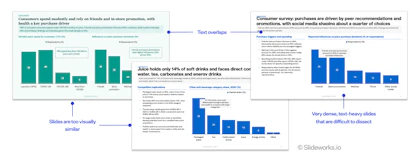
The web version produced a deck with sensible action titles and a closing “four strategic implications” slide but visually, it’s weak. Most slides follow the same template of blue header bars, bullet lists and a single blue bar chart, so the deck feels monotonous by slide five. Formatting errors are frequent with things like section labels (“SUMMARY”, “COMPETITION”) print on top of the slide titles, and several titles run into the subtitle below.

The add-in output is cleaner. The overlapping labels are gone and charts sit better on the page. Unfortunately, it keeps the same core issue with too much text per slide and too little variety in how evidence is shown.

Three Plus AI slides annotated to show overlapping text, visually similar layouts and dense, text-heavy slides that are hard to read

Examples from the two PlusAI decks that show some of the issues that need fixing

Cost and workflow: Plus AI’s Basic plan ($15 per month) does not allow file uploads, so you need Pro ($25 per month) or Team ($40 per month) to turn a report into a deck. Output is native PowerPoint or Google Slides.


Results: General-purpose AI models

ChatGPT (GPT-6.1 Sol)

Verdict: Clean and accurate, but too light and repetitive to pass as a consulting deck.

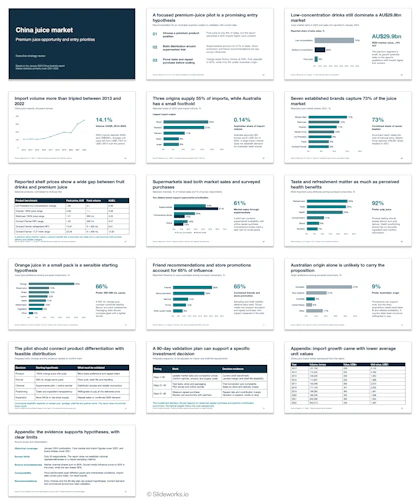
Overview of the 16-slide China juice market deck generated by ChatGPT, using the same bar chart and callout number layout on most slides

The output from ChatGPT

ChatGPT generated a 16-slide .pptx in 10 minutes. The deck represents the structure of the source report faithfully, and the numbers we spot-checked were correct. It also adds useful analysis the report does not contain, such as a calculated 14.1% import volume CAGR, and labels its recommendations as “analyst hypotheses”.

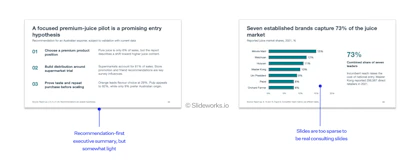
The weakness is in depth and variety. Titles mostly describe the data (“Seven established brands capture 73% of the juice market”) rather than state what it means for the client. Almost every body slide uses the same layout: one simple bar or line chart on the left and a large callout number on the right. A real consulting deck uses a much wider range of slide types (tables, driver trees, matrices, roadmaps) depending on the argument each slide makes.

Two ChatGPT slides annotated: a recommendation-first executive summary that is somewhat light, and a bar chart slide too sparse for consulting

The ChatGPT output is generally quite good, but lacks the depth and visual balance of real consulting slides

Cost and workflow: Included in a ChatGPT subscription. Output is a downloadable .pptx file.


Claude (Opus 5.5)

Verdict: The strongest out-of-the-box deck in the test. Good content, balanced visuals, but not yet client-ready.

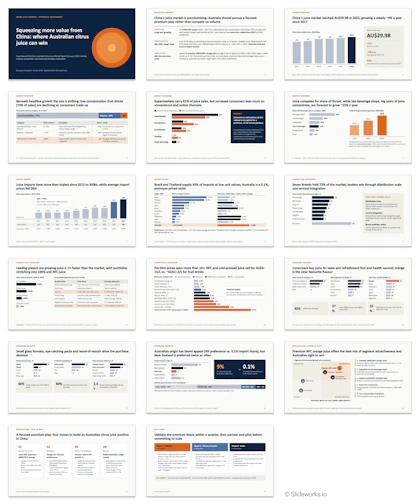
Overview of the 17-slide China juice market deck generated by Claude Opus 5.5, in navy and orange with action titles, charts and tables

The output from Claude

Claude asked two clarifying questions before building (storyline angle and deck length), then produced a 17-slide deck in 11 minutes.

The content is the best of the six tools. The executive summary follows the Situation-Complication-Resolution structure and ends with a clear recommendation. Titles are genuine action titles, footnotes explain where figures were estimated, and charts use a restrained palette with one accent colour for the data point that matters.

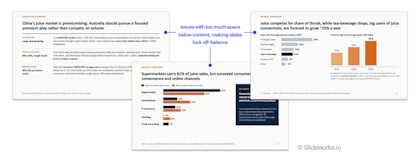
The main weakness is spacing. Many slides leave a large empty band below the slide body, which makes them look off-balance and unfinished. It doesn’t yet look like a McKinsey or BCG client deliverable, but it is the closest of the tools a reader could use without additional help.

Three slides from Claude's China juice deck, annotated to show too much empty space below the content, making the slides look off-balance

An example of slides from Claude that show how the slides are visually unbalanced

Cost and workflow: Included in a Claude paid plan. Output is an editable deck in Claude Slides that downloads as .pptx.

Extra test: What happens when you give Claude some extra consulting tips and references?

For comparison, we also ran the same prompt through Claude using our own Slideworks setup: the Slideworks slide master plus a reference pack of consulting slides from our library and some small skill files. The model, prompt and source were identical.

The output was the closest to a real McKinsey or BCG deck of anything we tested, and could be sent to a client after only minor, quick touch-ups. The remaining fixes were cosmetic: a “Company Name” placeholder in the footer and an empty closing slide.

The difference came from references, not from a better model. This is consistent with what we see in our own internal testing: a strong model given good examples of what “great” looks like beats a strong model given only a prompt. In later articles, we’ll show you in more detail how to replicate this setup.

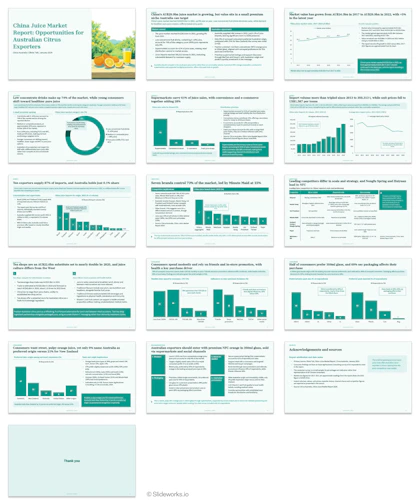
Overview of the 20-slide China juice market deck Claude built with Slideworks references, in a clean McKinsey-style layout with native charts

The output from Claude with some Slideworks settings and references

Which method should you use to create consulting-level slides?

Based on our test, there are three tips to creating AI consulting slides:

  1. For consulting-style deliverables, start with a general-purpose model, not a specialized slide generator
    Claude produced a better storyline and cleaner slides than both consulting-specific tools, at no extra cost beyond a plan many teams already have. The specialized tools still charge per slide or per token for output that needs more rework. In our opinion, the additional cost is not worth the output.
     
  2. For marketing, internal updates and visual-first decks, use Gamma
    If the goal is a good-looking deck in a few minutes, and nobody will judge it against an MBB standard, Gamma is the fastest route to a near-finished result.
     
  3. Whatever tool you use, give it references
    The largest jump in quality in our test came from adding consulting reference slides and a proper master, not from switching tools. If you have a library of strong past decks, attach a few as examples and ask the model to use them as references.

Comparison table of AI tools for consulting slides

Tested 2-5 October 2026 with one source document and one prompt per tool. Prices as listed on each vendor's site at the time of testing.
Tool Type Storyline Slide quality PowerPoint output Time to generate Cost for this deck Client-ready?
Perceptis Specialized consulting Good: action titles, takeaway bars Weak: 3D graphics, overlapping text, empty placeholders Native .pptx, add-in 11 min (20 slides) $29/month Starter; deck used 20 of 50 credits No
Oria Specialized consulting (Claude connector) Fair: fact base with closing recommendation Weak: cramped, inconsistent fonts, broken labels Editable .pptx costs extra tokens 19 min (12 slides) ~$6 in tokens + Claude plan No
Gamma General AI slide generator Fair: action titles, thin analysis Good for marketing; not MBB style .pptx, Google Slides, PDF A few minutes (20 slides) Paid plan needed above 10 slides No (fine for internal/marketing)
Plus AI (web) General AI slide generator Fair Weak: text-heavy, repetitive, overlaps Native PowerPoint / Google Slides ~2 min (20 slides) $25/month Pro (uploads not on Basic) No
Plus AI (add-in) General AI slide generator Fair Fair: cleaner, still text-heavy Inside PowerPoint ~8 min (16 slides) $25/month Pro No
ChatGPT (GPT-6.1 Sol) General-purpose model Fair: accurate, descriptive titles Fair: clean, light, one repeated layout .pptx download 10 min (16 slides) Included in ChatGPT plan No
Claude (Opus 5.5) General-purpose model Strong: SCR summary, clear recommendation Good: balanced visuals, uneven spacing Claude Slides, .pptx download 11 min (17 slides) Included in Claude plan Close, not yet

Tested 2-5 October 2026 with one source document and one prompt per tool. Prices as listed on each vendor’s site at the time of testing.


Conclusion

AI slide tools have come a long way since our first test in May. For design-forward, simpler presentations, you can paste in a document and the output will be near-finished. For consulting-style, client-ready decks, none of the tools gets there from a prompt alone but they are definitely getting much closer. General-purpose models such as Claude now produce the best starting point, and adding strong consulting references and a skill file closes most of the remaining gap.

In the coming weeks, we will publish detailed one-on-one tests of individual tools, including Claude versus Perceptis and Claude versus Oria, with full slide-by-slide outputs.

Frequently asked questions (FAQs)

Q: What is the best AI for PowerPoint presentations in 2026?

A:

In our October 2026 test, Claude (Opus 5.5) produced the best consulting-style PowerPoint deck from a single prompt, ahead of Perceptis, Oria, Gamma, Plus AI and ChatGPT. For design-led marketing decks, Gamma was the fastest and most polished.

Q: Can AI create McKinsey-style consulting slides?

A:

Not from a prompt alone. None of the six tools we tested produced a client-ready McKinsey or BCG deck. Claude came closest, and Claude given consulting reference slides and a proper master produced a deck that needed only minor touch-ups.

Q: Are specialized AI slide generators better than ChatGPT or Claude?

A:

No, not in our test. Perceptis and Oria produced reasonable storylines but weaker slides than Claude, and both charge per slide or per token on top of any model subscription.

Q: Can Claude create PowerPoint presentations?

A:

Yes. Claude can read a source document, ask clarifying questions, and build an editable deck in Claude Slides that downloads as a .pptx file. In our test it produced a 17-slide deck in 11 minutes.

Q: Can ChatGPT make a PowerPoint?

A:

Yes. ChatGPT (GPT-6.1 Sol) produced a downloadable 16-slide .pptx in 10 minutes. The slides were accurate and clean but too light and repetitive for a consulting deliverable.

Q: How long does it take AI to generate a slide deck?

A:

Between about 2 and 19 minutes for 12-20 slides in our test. Plus AI’s web app was fastest (about 2 minutes) and Oria was slowest (19 minutes). Generation time is small compared with the clean-up time a consulting deck still needs.