AI Slides

Can Claude Fable 5.1 make consulting-grade slides? We tested it on 3 decks

Updated: Sep 28, 2026
Can Claude Fable 5.1 make consulting-grade slides? We tested it on 3 decks

Summary:
Claude Fable 5.1 builds well-structured slide decks from a prompt, a PDF report or an existing PowerPoint file, but none of the three decks we generated were client-ready by McKinsey or BCG standards.

  • Fable 5.1 asked clarifying questions about audience, length and scope before building each deck.
  • Fable 5.1 kept messages and numbers consistent in all three decks.
  • Fable 5.1 did not write consulting-grade slide text in any of the three tests. The text was descriptive rather than insight-driven.
  • Action titles, lack of layout clarity, and too simplistic slides were the main gaps.
  • Across 27 checks (9 criteria × 3 tests), the decks scored 9 Yes, 6 Partially and 12 No.
  • You get better output by asking for consulting-level detail, uploading reference slides and building on your own slide master.

The world of slide creation is changing fast with the introduction of AI slide generation tools. On September 1, 2026, Anthropic released Claude Fable 5.1, which it describes as its most advanced model for coding and knowledge work. AI platform for finance, Hebbia, said Fable 5.1 "produced the best decks of any model we've tested."
With all this high praise, we were of course curious to see if it makes better consulting slides than its predecessors, Fable 5 and Opus 5.
 

In this article, we test Fable 5.1 on three different tasks: creating a deck from a prompt, turning a text report into a deck, and improving an existing deck. We score every output against nine criteria for consulting-grade decks and explain where and why the outputs fall short. Finally, we share tips for getting better decks out of Fable 5.1.


What makes a consulting-grade deck? Our 9 criteria

Before we start testing, we need to define what a "good" deck is. Our area of expertise is creating consulting-style decks like the ones top-tier firms such as McKinsey, BCG and Bain produce. 
A consulting-grade deck states one clear message per slide, backs every message with evidence, and follows a storyline a client can read without a presenter. These decks are typically information-dense, heavy on charts and self-contained enough to be left behind as reports for clients.
 

To measure the output of Fable 5.1, we rated each deck against these nine questions:

  1. Layout: Does the layout of each slide effectively communicate the key message?
  2. Clarity: Does each slide only contain information that is relevant to its main message?
  3. Action titles: Do the slides have good action titles? An action title is a full-sentence slide title that states the slide's takeaway, for example "Local supply capacity fell far short of FY22 demand" rather than "Supply capacity" (see how to write action titles like McKinsey).
  4. Tone: Is the level and tone of the text consulting-like?
  5. Visual balance: Is the entire deck visually balanced?
  6. Storyline: Does the deck follow a structure that mirrors how a consultant would structure it?
  7. Coherence: Are the messages and numbers consistent throughout?
  8. Client-readiness: Could the deck go to a client as it is?
  9. MBB look and feel: Do the slides look and feel like McKinsey or BCG slides overall?

We rated each criterion Yes, Partially or No.


How we tested Claude Fable 5.1

We ran three tests in the Claude desktop app in September 2026, using Fable 5.1 on the Medium effort setting.

Test Input Prompt Output
A: Simple prompt None "Create a project kickoff deck for our new strategy project" 14-slide deck
B: Report to deck 37-page PDF report by Monitor Deloitte (2023) "Turn this document into a deck" 10-slide deck
C: Improve a deck PowerPoint deck with a fictional business case "Make this deck better" 17-slide .pptx deck

Test A: Can Fable 5.1 create a consulting deck from a simple prompt?

For the first test, we wanted to see what Fable 5.1 produces from a completely raw starting point. We used the following prompt:

Create a project kickoff deck for our new strategy project

Claude Fable 5.1 prompt on Medium effort: "Create a project kickoff deck for our new strategy project"

The prompt we used to test how well Fable 5.1 creates slides from nothing but a simple prompt

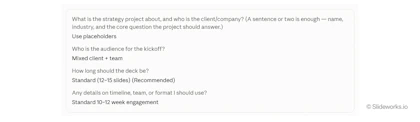
Fable 5.1 started by asking clarifying questions: who the client is, who the audience for the deck is, how long it should be, and whether there are details on timeline, team or format. We asked it to keep the deck general with placeholders and to use the recommended length.

Fable 5.1 kickoff deck questions answered: placeholders, mixed client and team audience, 12–15 slides, 10–12 week project

Test A result: A well-structured deck without consulting-level detail

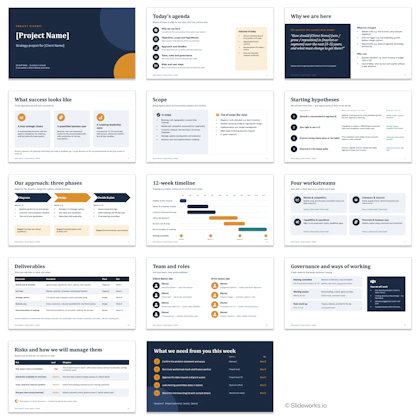
Fable 5.1 returned a 14-slide kickoff deck with a logical storyline and clean, balanced layouts. It had no action titles and far too little detail to pass as a consulting deck.
 

Score: 5 Yes, 0 Partially, 4 No.

All 14 slides of the Fable 5.1 project kickoff deck, from agenda and scope to timeline, team, risks and next steps

The output from our first test follows a familiar structure but lacks detail and depth.

Criterion Rating What we saw
Layout Yes The layouts are simple but useful for communicating the message and purpose of each slide.
Focus Yes Each slide only carries information relevant to its message.
Action titles No There are no action titles.
Tone No The slides are too light, with not enough detail to be consulting slides.
Visual balance Yes The deck is fairly balanced.
Storyline Yes The deck follows a logical storyline: purpose and aim of the project, then approach, timeline and deliverables, ending with an ask to the audience.
Coherence Yes Messages and numbers are consistent.
Client-readiness No The deck is not client-ready.
MBB look and feel No The slides look AI-generated and lack the detail, complexity, thoroughness and purpose of consulting slides.

Test B: Can Fable 5.1 turn a PDF report into a consulting deck?

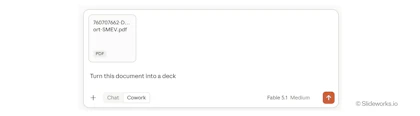
Second, we gave Fable 5.1 a 37-page PDF report, Electric Two-Wheeler Supply Chain Landscape in India, written by Monitor Deloitte for the Society of Manufacturers of Electric Vehicles (SMEV) in 2023. We asked it to simply turn the report into a deck.

Monitor Deloitte SMEV report PDF uploaded to Claude Cowork with the prompt "Turn this document into a deck" on Fable 5.1

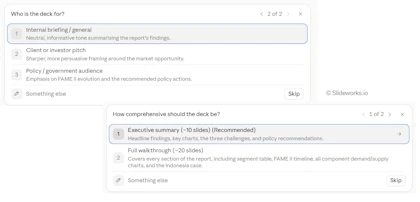
Before building the deck, Fable 5.1 asked how comprehensive the deck should be and who it was intended for. We chose the recommended 10 slide option and an internal audience.

Fable 5.1 asks how detailed the deck should be and who it is for; executive summary and internal briefing selected

Like before, Fable 5.1 asks a few questions to better understand who the deck was intended for.

Test B result: A faithful summary of the report, not a consulting storyline

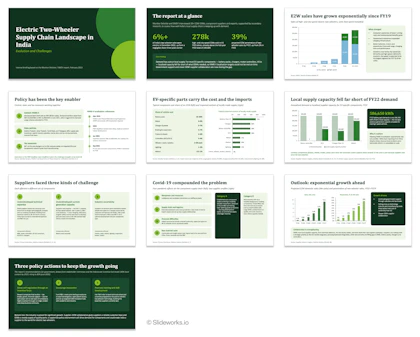
Fable 5.1 picked sensible layouts for list-type content, used charts for numerical content and kept the numbers consistent with the report. It followed the report page by page instead of building a storyline, added information that did not support each slide's message, and wrote descriptive rather than insight-driven text. 

Score: 1 Yes, 3 Partially, 5 No.

All 10 slides of the Fable 5.1 deck made from the Monitor Deloitte SMEV report, from key figures to three policy actions

The output from our second test of Fable 5.1

Criterion Rating What we saw
Layout Partially For slides on types of challenges and policy actions, the model chose suitable pillars and number balls, and it used charts for slides with numbers. On many slides, however, it highlighted parts of the slide that the message did not refer to.
Focus No Slides often contain confusing additional information that doesn't support the main message. The reader has to study the slide in detail to understand how the information is relevant.
Action titles Partially Some slides have action titles; others don't.
Tone No The text is descriptive rather than taking a point of view, as consulting slides do. Some slides use labels like "So what", which never appear in real McKinsey or BCG deliverables.
Visual balance Partially Somewhat balanced, but heavy on boxes and number balls.
Storyline No The deck is a direct read of the report and lacks a coherent storyline.
Coherence Yes Messages and numbers are consistent.
Client-readiness No Not really client-ready.
MBB look and feel No The slides are too simplistic and bluntly structured. They lack small details like call-outs and chart annotations, and bigger things like a compelling storyline and clean message slides.

Below are some specific examples showing the patterns:

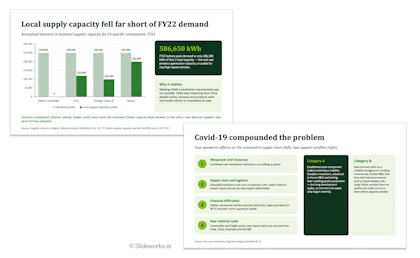
Two Fable 5.1 slides: a demand vs local supply chart for EV parts, and four Covid-19 effects beside two supplier profiles

A closer look at two of the slides from Fable 5.1 that show how the information on the slide is not immediately related to the main message.

Test C: Can Fable 5.1 improve an existing PowerPoint deck?

For our last test, we gave Fable 5.1 a PowerPoint deck with a made-up business case and asked it to make the deck better.

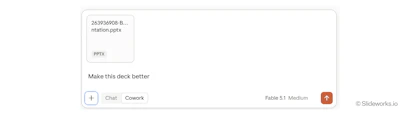
Business case PowerPoint uploaded to Claude Cowork with the prompt "Make this deck better" on Fable 5.1 Medium effort

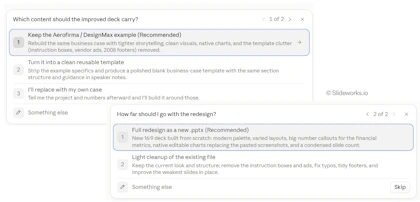
As in the other tests, the model asked clarifying questions: which content the improved deck should carry, and how far the redesign should go. It recommended keeping the example business case and doing a full redesign as a new .pptx file.

Fable 5.1 asks what the improved deck should contain and how far to redesign; keep example and full .pptx redesign chosen

Test C result: A tidier deck that is still sparse and not consulting-grade

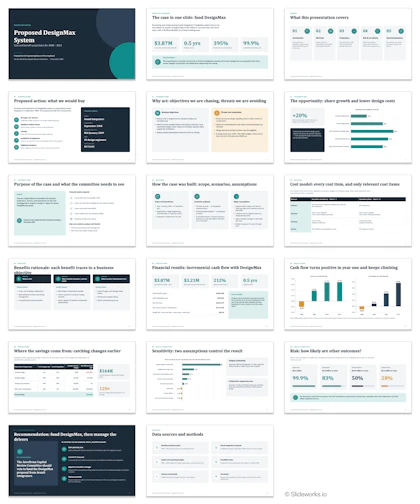
Fable 5.1 kept a rough consulting structure, consistent numbers and only relevant content on each slide. The slides stayed sparse, the action titles improved only partly, and the text did not read like a consulting deck. 

Score: 3 Yes, 3 Partially, 3 No.

All 17 slides of the DesignMax business case redesigned by Fable 5.1, with KPI tiles, cash flow charts and a recommendation
Criterion Rating What we saw
Layout Partially The financial slides use fitting layouts, such as KPI tiles, cash flow charts and a sensitivity chart, but many other slides fall back on equal-width boxes of bullets that list content rather than show the message.
Focus Yes Slides only contain relevant information, but the information is sparse.
Action titles Partially It has partial action titles, but they could be much better.
Tone No The text is not consulting-like at all.
Visual balance Partially The deck is clean and consistent, but text-light box slides leave large empty areas, while the cost model and savings slides pack small text into dense tables.
Storyline Yes The deck follows a consulting structure in rough terms.
Coherence Yes Messages and numbers are consistent (the numbers are dummy numbers).
Client-readiness No The deck is not client-ready.
MBB look and feel No The slides do not look like McKinsey or BCG slides.

Verdict: How good is Claude Fable 5.1 at consulting slides?

Fable 5.1 is a capable slide tool that creates excellent first drafts of decks, but it is still far from actual consulting slides.

Here, we sum up the results:

Criterion A: Prompt B: Report C: Improve deck
Layout Yes Partially Partially
Focus Yes No Yes
Action titles No Partially Partially
Tone No No No
Visual balance Yes Partially Partially
Storyline Yes No Yes
Coherence Yes Yes Yes
Client-readiness No No No
MBB look and feel No No No
Total (Yes / Partially / No) 5 / 0 / 4 1 / 3 / 5 3 / 3 / 3

Three patterns stand out from our Fable 5.1 test:

  • Fable 5.1 gets the basics right: It asks clarifying questions before building, keeps numbers consistent, and produces balanced, readable layouts.
     
  • Fable 5.1 does not write or design like a consultant: Slide text and layout design failed our consulting tone test in all three decks. The tone describes rather than states a point of view, action titles were missing or partial throughout, and the layouts themselves were too light and generic for consulting-grade slides.
     
  • Fable 5.1 structures better from a blank page than from a source document: The prompt-only deck had the most consultant-like storyline. The report deck followed the report's order instead of building an argument (see our guide to the pyramid principle for how consultants order a storyline).


How to get better consulting slides from Fable 5.1

Fable 5.1 is far better than previous models and with a few tweaks the output starts to come closer to real consulting decks. To get the results from okay to good, here are our best tips.

1. Ask explicitly for consulting-level detail and complexity

Fable 5.1 defaults to light, generic slides. If you explictly ask it to create decks that have the level of detail and complexity you'd expect from a McKinsey or BCG deck, it immediately produces better results.

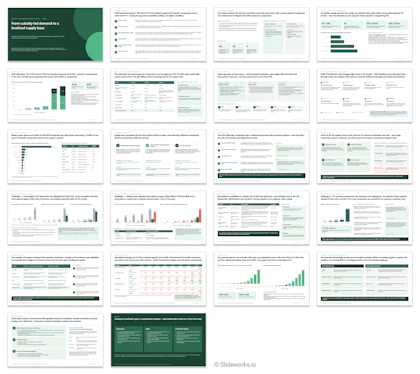
All 22 slides of a Fable 5.1 deck on India's electric two-wheeler supply chain, with dense charts, tables and action titles

The output is much improved just by asking the model to make the slides the same level of detail and complexity as consulting slides.

2. Give it good references

Fable 5.1 imitates the density and structure of what you show it. Give it some good references that have visual diversity and match the level of detail that you'd like to get a better outcome.


3. Ask it to build on your master

Upload your company's PowerPoint template and ask Fable 5.1 to build on that slide master. The output then uses your fonts, colors and layouts, and you spend much less time reformatting.


Conclusion

Claude Fable 5.1 is a step change from previous models. It builds decks with a logical structure, consistent numbers and sensible and visual diverse layouts, and it asks the right questions before it starts.

That being said, it still needs massaging and prodding before the output is client-ready. Across our three tests, it produced no client-ready deck, no consistent action titles and no consulting-grade text. Treat Fable 5.1 as a fast first draft: plan to rewrite the action titles, tighten the storyline and add the call-outs and annotations that make a slide consulting-grade.

Frequently asked questions (FAQs)

Q: Can Claude Fable 5.1 create PowerPoint presentations?

A:

Yes. In our tests, Claude Fable 5.1 built complete decks from a one-line prompt, a 37-page PDF report and an existing PowerPoint file, and it delivered the improved deck as a new .pptx file.

Q: Are Fable 5.1 slides client-ready?

A:

No. None of the three decks we generated were client-ready. Each needed stronger action titles, more insight-driven text and more detail before it could go to a client.

Q: Is Fable 5.1 better than Fable 5 and Opus 5 for slides?

A:

In our testing, Fable 5.1 produces better decks than earlier Claude models, but it still falls short of consulting standards on action titles, text tone and storyline.

Q: How do I get better slides from Fable 5.1?

A:

Ask explicitly for consulting-level detail, upload good slides as references, and have it build on your own slide master.

Q: Where do Fable 5.1 slides and real consulting slides differ?

A:

Real consulting slides from houses like McKinsey or Bain are denser, more visually diverse, more clearly tied to key messages, more structured, and with more details like chart annotations than the slides produced by Fable 5.1.

Q: Which AI tools are the best for producing consulting slides?

A:

The best AI tools out there right now to produce consulting-level slides or professionals slides in general are Claude Fable 5.1 and Opus 5.5. These two models can get very far with good prompts, references, and clean up afterwards.