How to Run a Quarterly Business Review (QBR): Structure, Slides, and Template
In this article we give you tips on how to run a quarterly business review (QBR) meeting most effectively based on our experiences at McKinsey and BCG.
Jul 21, 2026

This article defines what a McKinsey-level strategy presentation contains and takes you behind the scenes on how McKinsey, BCG, and Bain consultants produce decks to that standard. It compares the five categories of templates and tools against that McKinsey standard, with a scenario-by-scenario recommendation for which to choose and when.
Strategy presentations are a cornerstone of most businesses’ core documents. At their best, they set a clear and compelling direction for the entire organization that motivates and inspires employees and gives them actionable and understandable initiatives to set in motion.
At its worst, a strategy presentation is a collection of nice graphics and images that appear to have no connection to the daily workings of the company. It becomes the CEO’s pet project that is presented with great fanfare and promptly forgotten in a virtual drawer.
During our years at McKinsey, BCG, and Bain we were trained in the insider tools, tricks, and best practices that reliably result in the first type of strategy decks. Here, we’ll share those with you and show you which tools to use to take your own presentations to the McKinsey level. Let’s dive in.
McKinsey strategy presentations have a hard-to-put-your-finger-on-it quality that just makes them look and feel different than most other decks. This is due largely to three overarching components; engaging storytelling, balanced slide layouts, and strict slide discipline.
First, McKinsey decks tell a story. McKinsey consultants know that the most effective way to convince stakeholders and get points across is by great storytelling. Many decks simply present information, but top-tier consulting decks tell the story, in a way that is memorable and convincing. We dive deeper into different storytelling techniques like the situation-complication-resolution frameworks in other articles, but in this context, the story is usually based on the traditional strategy framework.
The strategy framework is a structured argument that runs from aspiration to execution:
A complete strategy deck walks through these layers in sequence, grounded in an analysis of the starting point: market dynamics, customer segments, competitive position, and internal performance. And most importantly, the sequence is told as a story with action titles that help build the narrative.
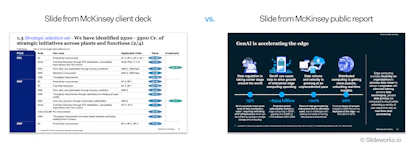
Second, McKinsey consultants rely on a much more detailed and data-driven library of slide layouts than is found commonly online. There is a clear difference between the slides used for public, “marketing” decks, and the slides used in actual client engagements.
McKinsey strategy decks will often have several slides with detailed charts, visually appealing graphics that contain complex information, and roadmaps with enough details to be actionable. This way of presenting information and the level of density of information is also in stark contrast to many commonly found slide repositories that rely on colors, graphics, and images to convey the message.

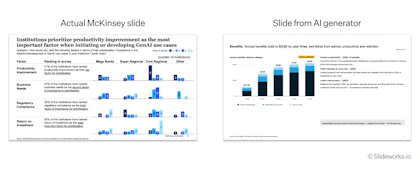
A real McKinsey client slide next to a typical external McKinsey slide. The client slide is more dense and data-heavy, while the external slide relies more on images.
Third, McKinsey, Bain, and BCG consultants have a strict slide discipline on everything from action titles to one message per slide to small tricks like removing filler words like “the” or “a”. Individually these things seem like extras or nice-to-haves, but collectively they add up to that je ne sais quoi that makes the outputs feel just that little bit better.
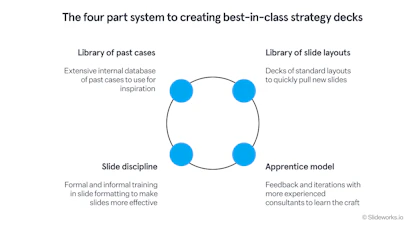
The reason consulting decks reach this standard has less to do with talent than most people assume. Inside McKinsey, BCG, and Bain, presentation production runs on a system, and understanding that system helps you decide which tools to use and how to use them effectively.
From our years inside these firms, we’ve found the system has four parts:
Although nothing beats the actual lived experience, there are several tools that can help you replicate parts of that system:
| Internal advantage | What it gives consultants | How to replicate it in 2026 |
|---|---|---|
| Library of past cases | Best-practice storylines and worked detail | Consulting-grade templates with real worked examples; free collections of real MBB decks |
| Library of complex slide layouts | Proven layouts chosen, then filled | Consulting-grade template libraries; add-in slide libraries; AI slide generators |
| Apprenticeship in layout judgment | Knowing which layout fits which message | Studying real decks against the standard; worked examples that show the choice made; hands-on guides |
| Slide discipline | Best-practice slides and messages | Method guides on action titles and SCR; LLMs as a sparring partner for drafting storyline options |
One note on the last row: LLMs are useful for storyline drafting, since generating three candidate storylines to react against mimics how a team brainstorms structure. What the LLM does not supply is the judgment and sanity checking trained by the review cycle, so treat its output as raw material and apply the action title test to everything it produces.

The internal system behind consulting-grade decks. Each part can be replicated with external tools, as shown in the table below.
Now, let’s look at the specific tools that can help you in each part of the system above, as well as pricing and where to find them.
Nothing beats the real apprenticeship practiced within MBB, but you can recreate some of that by studying real cases by McKinsey, BCG, and Bain, and by reading articles by past consultants on some of the tips and tricks for slides that are taught internally.
Here at Slideworks, we have gathered the most comprehensive libraries of real McKinsey, BCG, and Bain cases, as well as other consulting houses. The list is free to browse and many of the decks can be downloaded. However, we’d recommend focusing on the actual client projects rather than the many industry reports and other promotional decks, as the actual client decks are much more informative on the slide standard used in MBB.
We have also spent a long time writing comprehensive guides on the techniques and tricks of the trade we learned during our years at McKinsey, BCG, and Bain. The Slideworks guides are written with the aim to offer exactly that type of practical, detailed, and hands-on advice that is common within consulting firms.
We can also recommend browsing the articles written by Joe at Stratechi.com. Joe is a former McKinsey consultant and writes in-depth articles on various strategy topics.
Strength: Articles spell out the techniques in detail, while libraries offer real examples which are often the best way to “get it”.
Limitation: Very few actual client engagements available, and they are often dated or not strategy docs.
Consulting-grade templates provide the complete deck: storyline, slide layouts, and worked examples built to the MBB standard. They can be used both as a more comprehensive alternative for the past case libraries and as the ready-to-go collection of great slide layouts to fill in.
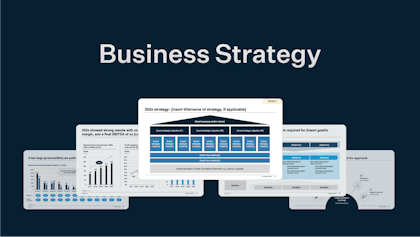
The Slideworks Business Strategy Template is built directly around the strategy house framework described above. The template contains 305 PowerPoint slides organized as an end-to-end storyline, from starting-point analysis through aspiration, strategic choices, initiatives, enablers, and foundation, plus a supporting Excel model, a 100-day plan add-on for new leadership, and four full-length, real Fortune 500 strategy presentations as worked examples. The template costs $149, is also native in Google Slides, and holds a 4.8 rating across 41 reviews. The Business Strategy Template is included in the Full Access bundle alongside all other Slideworks templates.
Flevy is a marketplace that offers strategy documents from many independent authors at an average of around $65 per document. The catalogue is broad, but most documents explain frameworks rather than provide a complete presentation storyline, and quality varies by author.
Strength: Storyline and standard come built in - you adapt a proven structure rather than inventing one.
Limitation: Templates don’t do your analysis, you still need to supply the strategic thinking, tough choices, and the data.
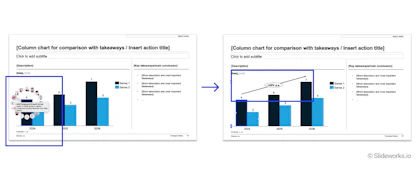
Add-ins are a huge part of the MBB consultant's toolbox and help speed up and streamline individual slides, as well as deck-wide formatting sweeps. Our favorite add-ins include think-cell (~$336 per user per year for the full functionality) and PPT Productivity ($179 per year for the Power suite). We also have our own PowerPoint add-in in Slideworks that gives you the entire slide library in a searchable format directly in PowerPoint.
For a strategy deck full of market sizings, waterfall charts, and initiative roadmaps, a charting add-in saves hours. What add-ins don't provide is the deck itself i.e., no storyline, no strategic structure, no worked examples.
Strength: Speed on every individual slide.
Limitation: An add-in makes a well-structured deck faster and a badly structured deck faster - it doesn't know the difference.

Think-cell offers a range of useful chart tools, including the automatic CAGR calculation and line.
Tools such as Gamma ($108 per year for the plus version) and Claude Design (price depends on plan and use) generate a visual draft from a text prompt in minutes, and consulting-focused entrants are improving layout quality.
However, for strategy decks specifically there are a few places where AI generators fall short. First, they are often too generic and “sales”-y with rampant hallucinations that are time-consuming to check and correct. Second, although LLMs produce plausible-looking slides they often lack strict messaging discipline and visual balance. And third, AI decks never make the tough choices.
For a more in-depth discussion, see our articles where we tested several AI slide generators and discussed how to best incorporate AI in your workflow.
Strength: Fast first visual drafts and internal presentations.
Limitation: Too much hallucination and 70% versions that take more time to correct than actually building the slides yourself.

A McKinsey-standard strategy slide next to AI-generated output. The AI draft looks finished but still not quite sharp, and falls apart upon closer inspection.
Marketplaces such as SlideModel, Pitch, and Slidesgo offer inexpensive, visually polished strategy-themed templates.
However, measured against the McKinsey standard, marketplace templates are decorative rather than structural, e.g., a slide titled “Our Strategy” with five colorful pillars, but no storyline connecting aspiration to choices to initiatives to KPIs. Use these marketplaces for visual inspiration on how you can graphically represent things but not as the actual slides.
Strength: Low price (or free) and visual variety.
Limitation: These slides are designed by graphic designers, not consultants, and lack the depth and structure of real consulting slides.

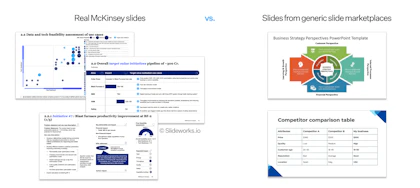
A consulting-grade slide next to a typical marketplace template. The marketplace slide is visually polished, but lacks the level of detail and design that the consulting slides have.
Each tool plays a different part in the overall presentation system. Here is an overview of all tools to help you decide what to move forward with:
| Category | Examples | Provides the storyline? | Provides worked examples? | Speeds up slide production? | Cost |
|---|---|---|---|---|---|
| Libraries of real cases and techniques | Slideworks, Stratechi | Yes | Yes | Partially, but requires you to actively seek out the learning | Free |
| Consulting-grade templates | Slideworks, Flevy | Yes (Slideworks: full strategy house) | Yes (Slideworks: 4 real Fortune 500 decks) | Partially with layouts ready to populate and proven storylines | $65–149 |
| PowerPoint add-ins | think-cell, PPT Productivity | No | No | Yes, charts and formatting | $179–371/yr |
| AI slide generators | Claude Design, Copilot, Gamma | Partially - visual sections, weak logic | No | Yes, especially good for first drafts | Free–$200/mo |
| Generic marketplaces | SlideModel, Slidesgo | No | No | Not really | Free–$25/mo |
Just as each tool has different strengths and limitations, each tool is also better suited for different types of strategy decks. Below we suggest which option suits your particular scenario best:
| Scenario | Best option |
|---|---|
| Annual or 3–5-year strategy for the board | Consulting-grade template |
| First strategy deck as a new strategy hire | Consulting-grade template + real deck examples |
| 100-day plan for incoming leadership | Consulting-grade template (100-day add-on) |
| Deck structure is set; 40 charts to build | Charting add-in |
| Quick internal strategy update | AI generator fed old deck and new data, then rewrite the action titles |
| Reformatting an existing deck to company branding | Add-in (formatting sweep) |
| Strategy offsite pre-read | Consulting-grade template, condensed storyline |
| Weekly deck production across many projects | Template library + add-in combined |
| Condensed strategy overview for promotional use internally and externally | AI generators with strict fact checking and visual control |
For most strategy teams, executives, and consultants, the effective setup is a consulting-grade template for deck-level structure plus one add-in for slide-level speed and potentially an LLM for sparring and storylining. The template becomes your base that you can pull from to quickly set up new decks that are on point. The add-in makes your charts look professionals and speeds up formatting. The LLM can help you draft and discuss an overall storyline, but remember to feed it the information from sources like the real past cases and expert-level articles and frameworks.
So in summary; if the deck is going to a board or leadership team, start from the Business Strategy Template: the strategy house storyline, 305 slides, and four real Fortune 500 examples mean you begin from a proven argument rather than a blank page. If your work is mostly chart production inside existing structures, start with think-cell or a comparable add-in. Use AI generators for speed on low-stakes drafts, and for more promotional decks.
And most importantly: sanity-check everything! Does the slide make sense? Does the data seem right? And does the whole deck look balanced?
The Slideworks Business Strategy Template gives you the complete strategy house storyline - 305 editable slides, an Excel model, a 100-day plan for new leadership, and four full-length, real Fortune 500 strategy presentations - created by ex-McKinsey, BCG, and Bain consultants
Get started today
A strategy presentation template is a pre-built slide deck that provides the structure of a strategy presentation — storyline, section order, slide layouts, and action titles — so you populate a proven argument with your own analysis instead of building from a blank page.
A complete strategy presentation includes a starting-point analysis, an aspiration (purpose and vision), explicit strategic choices, strategic initiatives linked to measurable KPIs, enablers, and foundation. It should be told as a compelling story, not just as a dry presentation of facts.
AI tools generate fast visual drafts of strategy presentations but do not produce the disciplined choice logic e.g., explicit where-to-play and what-not-to-do decisions, or strict slide discipline that characterizes a real consulting deck. AI drafts need heavy reformatting and restructuring, as well as fact checking, before high-stakes use.
A board-level strategy presentation typically runs 20–50 slides in the main storyline, with additional analysis in the appendix. Strategy pre-reads can be 100+ slides.
A strategy template provides the deck-level structure: storyline, slide layouts, and worked examples. A PowerPoint add-in provides slide-level speed: chart automation and formatting shortcuts. Most professionals producing strategy decks regularly benefit from using both together.
McKinsey consultants work from an internal system rather than from blank pages: a knowledge base of past case decks for storylines, libraries of proven slide layouts, apprentice-style training in layout choice, and formal training in action titles. Outside the firms, consulting-grade templates with worked examples, add-in slide libraries, and real MBB deck collections replicate most of this system.