Slide Writing

Best Tools and Templates for Business Case Presentations in 2026

Updated: Sep 7, 2026
Best Tools and Templates for Business Case Presentations in 2026

Summary

The best setup for a business case presentation in 2026 is a consulting-grade template for the argument structure, a linked Excel model for the financials, and a charting add-in for production speed. 

This article, written by former McKinsey, BCG, and Bain consultants, compares four categories of tools against that standard: consulting-grade templates, financial modeling tools, PowerPoint add-ins, and AI generators. 

It defines the seven blocks an executive-ready business case contains, explains why AI-generated decks fail on traceable numbers and options analysis, and recommends which tools to use for board approvals, CFO-heavy cases, chart-heavy builds, and quick internal requests.

Business cases are a core part of most corporate workplaces. They are used in virtually all functions and industries when decisions have to be made on whether or not to invest resources (time and money) into a new product, IT system, manufacturing plant etc. The successful business case must therefore convince an executive audience that a specific investment deserves budget, people, and time, and it’s judged on the strength of its argument and the credibility of its numbers.

To build a successful business case requires a combination of asking the right questions, finding the appropriate data, and packaging it all in an effective structure, outputted as either slides or a text document. For the packaging part in slides, there are several tools available that can support this work. In September 2026, the tools for building a great business case presentation fall into four categories: consulting-grade templates, financial modeling tools, PowerPoint add-ins, and AI slide generators.

In this article, we recap what a business case answers and how it is built, define what an executive-ready business case presentation contains, compare the four tool categories against that standard, and give our recommendation as ex-McKinsey, BCG, and Bain consultants on how to combine them.


Which key questions does a business case answer?

Before we dig into the tools, let’s briefly recap what a business case actually is and the questions it answers.

1. Why do we need to act, and why now?

The situation the organization is in, the problem or opportunity that has appeared, and the cost of leaving it alone. This is the part decision-makers must accept before anything else will land. If they dispute the problem, they will dispute the solution.

2. Which option should we choose?

The realistic ways of addressing the problem, always including doing nothing, compared against the same criteria: cost, benefit, risk, time to value, and fit with strategy. The recommendation is the output of that comparison. Presenting a recommendation without the comparison turns the business case into a pitch.

3. What will it take, and what will we get back?

The investment required, the returns expected and when they arrive, the assumptions underneath both, and the risks that could move the numbers. This is the answer the finance function reads first and tests hardest.

Note that a business case and business plan are two separate types of documents. A business plan describes how a business will operate over time, while a business case argues for one specific decision. This means the two should be structured in very different ways and carry very different arguments.


How do you create a business case?

You typically build a business case through a systematic process:

How to build a business case in six steps
  1. Identify the needIdentify the business need behind the case
  2. Outline solutionsOutline the candidate solution(s)
  3. Quantify each optionFind data that quantifies the development, implementation, and impact of each solution
  4. Assess pros, cons, and risksIdentify pros and cons (including stakeholders) and potential risks
  5. Choose the best fitChoose the best-fit option
  6. Package for decision-makersPackage everything in a digestible way for the right stakeholders

Slideworks.io

In plain English, the packaging means creating the slides (or text document) that summarizes all core parts of the business case. This is what we’ll focus on for the remainder of this article.


What an executive-ready business case contains

The packaging of the business case data and recommendations is a crucial step in creating a best-practice business case. Here, you need to combine structure (what the presentation contains and in what order) and formatting (how it looks).

Structure What it contains

Usually left to you

Does the presentation give decision-makers everything they need, in the order they need it?

A convincing business case walks through:

  • Executive summary carrying the full argument on one slide
  • Situation and complication that justify acting now
  • Options analysis with a do-nothing baseline and explicit criteria
  • Financial case with NPV, IRR, payback, stated assumptions and a sensitivity view
  • Risks and mitigations scored by probability and impact
  • Implementation plan and governance with phases, owners and decision cadence
  • Recommendation and next steps that close the decision
Formatting How it looks

Often set by your company template or corporate colors

Does the presentation look the way the audience expects, so nothing distracts from the argument?

A convincing business case is formatted with:

  • One message per slide, stated in an action title
  • Consulting-grade layouts chosen for the message, not for decoration
  • Consistent charts for waterfalls, payback bridges and sensitivities
  • Corporate colors and fonts applied through the slide master

Sometimes both are dictated by your company with specific business case templates that need to be filled out. But in most cases, the formatting is driven by your company’s corporate colors or your own visual preferences, while the structure is more difficult to pinpoint. Indeed, it’s most often the structure and not the actual recommendations or underlying data that separates great business cases from ones that feel somehow off or unconvincing.

What does an ideal structure look like?

The structure top consulting firms like McKinsey and BCG use follows the Situation-Complication-Resolution storyline, and a complete business case presentation walks through ten distinct sections, which you can read more about in our extensive guide on writing a business case.

For the purpose of choosing tools, those ten sections group into seven blocks:

Structure of an executive-ready business case presentation
  1. 1Executive summary

    The full argument on one slide, written so a decision-maker who reads nothing else still understands the situation, the problem, the recommended option, and the financial impact. See our guide on how to write an executive summary.

Why do we need to act, and why now?
  1. 2Situation and complication

    The context and the specific problem or opportunity that demands action now. The complication is what justifies the meeting.

Which option should we choose?
  1. 3Options analysis

    The high-level solution, then two to four genuine options, always including the do-nothing baseline, compared against explicit decision criteria. A business case with one option is a pitch. The comparison is what makes it an analysis.

  2. 4Financial case

    The recommended option in detail: the investment required, the expected benefits, and the metrics your finance function will test, NPV, IRR, and payback period, with the key assumptions stated and a sensitivity view showing how the result moves when assumptions change. A CFO will not accept numbers whose assumptions are not visible.

What will it take, and what will we get back?
  1. 5Risks and mitigations

    The main risks scored by probability and impact in a risk matrix, each with a mitigation. Naming the risks yourself is more persuasive than letting the audience discover them.

  2. 6Implementation plan and governance

    Phases, milestones, owners, and the decision cadence, laid out as a roadmap. This is what turns approval into a project.

  1. 7Recommendation and next steps

    A closing recommendation slide that restates the return and the strategic fit, followed by the immediate actions you need approved. Ending on the analysis leaves the decision open; ending on next steps closes it.

Slideworks

Regardless of tools and medium, your business case should follow that structure and storyline to be convincing.


The four categories of tools for business case decks

Now that we’ve looked at optimal output, we’ll dive into the tools that can help you reach that. They broadly fall into four categories for business case presentations; templates, modeling tools, PowerPoint add-ins, and AI slide generators.


1. Consulting-grade business case templates

Consulting-grade templates provide the complete presentation: storyline, slide layouts, financial model, and worked examples built to the MBB standard.

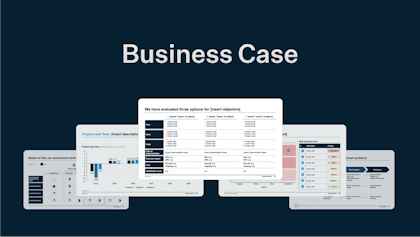
The Slideworks Business Case Template is built around the Situation-Complication-Resolution structure described above. It contains 271 PowerPoint slides organized as an end-to-end storyline, five Excel financial models covering ROI and NPV analysis, and a Word document for the written case. Three full-length worked examples show the structure applied to different decisions: a technology investment, an HR initiative, and an energy plant refurbishment. The template costs $149, is also available in native Google Slides, holds a 4.7 rating across 117 reviews, and is included in the Full Access bundle alongside all other Slideworks templates.

Flevy offers business case documents from many independent authors at an average of around $65 per document. The catalogue is broad, but most documents explain business case theory rather than provide a complete presentation storyline with linked financials, and quality varies by author.

Strength: The argument structure and the storyline logic come built in, tested against real decisions and real executives.
Limitation: A template is just a static document that you need to tailor to your situation.

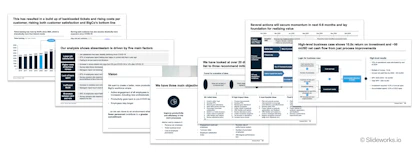
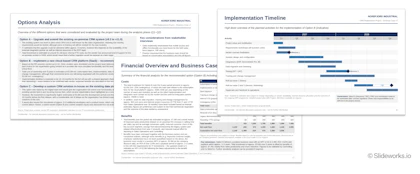
Slides from the Slideworks Business Case template showing real-life examples of what high-end business case slides should look like

2. Financial modeling tools

The financial case should live in Excel as the single source of truth, and the tools that matter here connect the model to the deck.

Macabacus (from $200 per user per year; the Excel-to-PowerPoint linking sits in the Professional tier at around $360) is the strongest option if your case is financially complex: model auditing, 100+ modeling shortcuts, and Excel-to-PowerPoint links that survive file moves, so the deck updates when the model changes. It's built for investment banking and FP&A workflows and is Windows-only last we checked.

For most business cases, a well-structured model in native Excel, included in your Microsoft 365 subscription, is enough, provided every output slide links to it rather than carrying retyped numbers. Manually retyped figures are how version errors reach the boardroom, and a business case that shows different numbers on two slides is finished as an argument.

Strength: Credible, updatable numbers that don't change and can be traced.
Limitation: A modeling tool merely quantifies the benefits and costs. It can never supply the logic or arguments tied to real-world business environments.


3. PowerPoint add-ins

Add-ins such as think-cell (around $328 per user per year for one to four users) and PPT Productivity ($179 per year for the Power suite) accelerate the slide production itself. Business cases lean heavily on exactly the chart types PowerPoint builds poorly: cost-benefit waterfalls, payback bridges, and sensitivity tornado charts. A charting add-in produces them in minutes, linked to the model. 
The Slideworks PowerPoint add-in covers the other half of the production job: it puts the full library of consulting slide layouts, including business case specific slides, into a searchable panel inside PowerPoint.

Strength: Speed on every chart-heavy slide.
Limitation: An add-in accelerates whatever structure you give it, whether that structure makes sense or not.

Business case slides from an AI slide generator with too much text

4. AI presentation generators

Tools such as Gamma (from $108 per year) and Claude (pricing depends on subscription) can draft a visually complete business case deck from a prompt in minutes.

For business cases specifically, the gap is typically accountability of numbers, sanity-checked arguments, and verbose slides. AI-generated decks produce plausible sections and placeholder financials, but a business case ultimately rests on the credibility of its data and the validity of its arguments.

In our test of five AI presentation tools, AI drafts also blurred the options analysis, presenting the preferred option persuasively rather than comparing real alternatives against criteria. We cover the structural gaps in our post on how consulting decks differ from AI-generated decks.

Strength: Fast first drafts of the narrative sections, or getting inspiration on layouts.
Limitation: Numbers often a mix of real data and hallucinated or cherry-picked data, arguments not sanity checked in your context, and slides overly verbose.


Comparison of tools

Each tool has different strengths and limitations, so for ease of use see here a summary comparing them:

Category Examples Provides the argument structure? Provides the financials? Typical cost Best for
Consulting-grade templates Slideworks Business Case, Flevy Yes, complete storyline Yes, linked Excel models (Slideworks) $65–149 one-time High-stakes approvals
Financial modeling tools Macabacus, native Excel No Yes, model-side Included in Microsoft 365 to $360/year Financially complex cases
PowerPoint add-ins think-cell, PPT Productivity, Slideworks add-in Partially – Slideworks add-in supplies the layout library; charting add-ins do not Partially – chart links to the model only $179–328/year Chart-heavy production
AI generators Gamma, Claude Partially – needs restructuring No, placeholders From $30/month Fast narrative drafts

Which option fits your business case scenario?

All four categories of tools can be useful in different situations:

Scenario Recommended setup
Board or investment committee approvalConsulting-grade template plus linked Excel model
CFO-heavy case with complex financialsTemplate plus Macabacus for model-to-deck links
Deck structure set, 30 charts to buildCharting add-in
Quick internal funding requestAI draft, then rebuild options and financials properly
Recurring business cases across a teamTemplate as the team standard, add-in for production speed

Our recommendation

Over our years at McKinsey, BCG, and Bain, we built and reviewed hundreds of business cases. The ones that were approved shared three elements: a tight argument, numbers the finance function could reproduce, and a presentation that made both easy to follow.

We recommend choosing your tools in that order; Start with structure. A consulting-grade template gives you the storyline and section logic. An LLM can help you draft candidate storylines and stress-test your assumptions, but it should not generate the deck blindly. Then build a linked Excel model so every number on a slide traces to a stated assumption. Add one charting add-in last, and only if the deck is chart-heavy. Buying the add-in first is the most common mistake we see: it makes a weak argument faster to produce, not stronger. And as always, remember to sanity check every assumptions and answer – the single biggest lever to making sure your output will pass the sniff test!

Create your business case from a proven structure

The Slideworks Business Case Template gives you the full package: 271 editable slides, five Excel financial models covering ROI and NPV, a Word document for the written case, and three full-length worked examples, created by ex-McKinsey, BCG, and Bain consultants.

Get a headstart today
Consulting-style PowerPoint template slide examples

Frequently asked questions (FAQs)

Q: What is the best tool for creating a business case presentation?

A:

For high-stakes decisions, the most reliable setup is a consulting-grade business case template paired with a linked Excel financial model, with a charting add-in for production speed. Templates provide the argument structure; models make the numbers credible; add-ins make the build fast.

Q: What should a business case presentation include?

A:

A complete business case presentation includes an executive summary, the situation and complication, an options analysis with a do-nothing baseline, a financial case covering ROI, NPV, and payback with stated assumptions, a risk matrix with mitigations, and an implementation plan with governance.

Q: What is the difference between a business case and a business plan?

A:

A business case argues for one specific decision, such as an investment or project, and ends when the decision is made. A business plan describes how an entire business will operate and develop over time. The two documents have different structures and different audiences.

Q: Can AI create a business case presentation?

A:

AI tools can draft the narrative sections of a business case quickly, but they produce placeholder financials and weak options analysis. Since a business case is approved on traceable numbers and a genuine comparison of alternatives, AI drafts need their financial case, options section, and recommendations section rebuilt before serious use.

Q: What financial metrics belong in a business case?

A:

The standard metrics are return on investment (ROI), net present value (NPV), and payback period, supported by clearly stated assumptions and a sensitivity analysis showing how results change when key assumptions move.

Q: Why include a do-nothing option in a business case?

A:

The do-nothing baseline shows the cost of inaction and turns the recommendation into a comparison rather than a pitch. Decision makers approve options relative to alternatives, and the baseline is the alternative that always exists.